马上注册 家电论坛,众多有奖活动等你来参与!
您需要 登录 才可以下载或查看,没有账号?注册

x
Flagship OLED and LCD TV Display Technology Shoot-Out LG OLED 65 inch 4K Ultra HD DCI Gamut Curved Screen TV Samsung LCD 65 inch 4K Ultra HD DCI Gamut Curved Screen TV Dr. Raymond M. SoneiraPresident, DisplayMate Technologies Corporation
Copyright © 1990-2015 by DisplayMate Technologies Corporation. All Rights Reserved. This article, or any part thereof, may not be copied, reproduced, mirrored, distributed or incorporated into any other work without the prior written permission of DisplayMate Technologies Corporation
| | LG OLED TV | Samsung LCD TV | Screen Shot Photos of the TVs |
Introduction An impressive new generation of TVs with the very latest advanced display technologies launching in 2015 include the newest state-of-the-art large screen OLED displays and LCDs with Quantum Dots and Full Array Local Dimming, plus a new wide DCI Color Gamut, 4K Ultra HD resolution, and curved screens.
To explore these new OLED and LCD TV technologies in-depth we have lab tested, analyzed, and compared side-by-side two 2015 flagship top-of-the-line TVs from LG and Samsung that have competing display technologies. Both are 65 inch 4K Ultra HD DCI Color Gamut curved screen TVs – an LG OLED TV (model 65EG9600) and a Samsung LCD TV (model UN65JS9500).
Dual Content Standards While both these TVs have the latest next generation display hardware, the available consumer content produced for 4K Ultra HD with the DCI Color Gamut is still very scarce. In 2015 over 99 percent of all currently available consumer content is for the existing Full HD resolution with its own sRGB / Rec.709 Standard and Color Gamut. So it is essential that these latest TVs can also accurately display the large base of existing Full HD content with excellent picture quality. This content not only includes Over The Air (OTA), Cable, and Satellite TV broadcasting, but also Blu-ray, DVD, digital camera, web content, internet streaming, and computer content, including photos, videos and movies, which are all based on the sRGB / Rec.709 Gamut and Standard. It will take years to build up a content base for 4K Ultra HD with the DCI Color Gamut, which will become available first through internet streaming. So we have also measured how well these TVs reproduce the current Full HD content that everyone is watching now.
Former TV Technologies TV technology has been changing at an increasingly faster pace over the past ten years. Up until that time CRT TVs had dominated since the beginning of TV broadcasting in the 1940s. But in 2007 LCD TVs surpassed CRT TV sales, then in 2009 analog NTSC broadcasts ended and were superceded by digital TV. In 2013 LG and Samsung introduced the first production OLED TVs, and in 2014 Plasma TV production ended. Over the same period DLP, LCoS, and FED TVs also came and went. A lot of history in a short time – TV display technology is now both very fast moving and very competitive… There are No LED TVs! There is still a lot of consumer confusion regarding LED TVs versus OLED TVs… The first thing we need to clear up is the widespread misunderstanding created by the marketing of “LED TVs” – there aren’t any! The so-called LED TVs are just LCD TVs that have a backlight that is made of white LED lights. The LEDs are not the display, just the backlight, nothing more! OLEDs are an entirely different class of emissive imaging display technology (that doesn’t use a backlight). Unfortunately, many people think they already have an LED/OLED TV at home, but they actually have an LCD TV… Newest TV Technologies Standard traditional flat screen LCD TVs have by far the largest current installed base and market share, and also the lowest entry level pricing, but they are now being challenged by the newest OLED TVs with curved displays and by enhanced LCD TVs with Local Dimming and Quantum Dots as the latest pioneering technologies offering much better picture quality and cutting edge state-of-the-art performance that we will cover in detail here. Overview of the Existing and Newest TVs and Standards If you have a reasonably up-to-date TV purchased within the last 5 years, you most likely have a Full HD 1920x1080 pixel resolution flat screen LCD or Plasma TV with an sRGB / Rec.709 Standard and Color Gamut. Screen size has also been increasing quickly, with 60 inches and above the new large screen high-end, and getting larger. Many of the new screens are also slightly curved – we’ll explain the advantages below. The newest TVs have an Ultra HD 3840x2160 pixel resolution, also called 4K, which is twice the resolution of Full HD and has 4 times the number of pixels. The new DCI (Digital Cinema Initiative) Color Gamut is 26 percent larger than the current sRGB / Rec.709 Color Gamut, with more saturated Red and Green Primaries. Ultra HD TVs need 90 percent of DCI Gamut. But please note that a UHD TV cannot increase the picture resolution or the Color Gamut of any earlier non-UHD picture content (regardless of what any sales person tells you). We will examine these issues in detail below. Latest OLED TV Technology OLEDs are thin solid state devices that directly emit colored light. OLED displays have been improving rapidly with increasing screen size, peak brightness, and power efficiency. They don’t need a backlight and supporting optical components so they are considerably thinner and lighter than LCD displays. As a result, OLED TVs are considerably thinner (with the screen just 0.2 inches deep for this 65 inch model) and considerably lighter than LCD TVs – the tested LCD TV is 52 percent heavier than the OLED TV (without their metal stands). It is also easier to make OLEDs with curved screens, which we will explain below.
OLED displays first appeared in consumer products in 2010 on smartphones with 4 inch screens. Making a large TV size OLED display is considerably more challenging, so that took a few years more. LG introduced their first generation 55 inch Full HD OLED TV in 2013, which was the best TV display we had ever tested up to then – and almost all reviewers agreed that OLED outperformed the best Plasma and LCD TVs in producing the very highest picture quality. The LG OLED TV that we test here is not only larger but also has even better display performance and picture quality.
LG has implemented some special OLED technology for their TVs. First of all, rather than laying out three separate sets of OLED Red, Green, and Blue sub-pixels throughout the screen, the LG TV instead has a single uniform set of OLED White sub-pixels throughout made as a combined stack of Red, Green, and Blue OLED colors for each sub-pixel. The sub-pixels then each have their own individual Red, Green and Blue color filters that select the specific Red, Green or Blue OLED color for that sub-pixel. This approach greatly simplifies the OLED production, improves yields, and lowers the manufacturing costs. In addition, LG has also added a 4th clear sub-pixel to every pixel that just produces pure White. This increases the display’s power efficiency and also improves color accuracy and color management.
Latest LCD TV Technology Samsung also introduced their first generation OLED TV in 2013, but for the 2015 models they decided to go back to LCDs, most likely due to OLED manufacturing costs and yields, and to concentrate on the production of smaller mobile OLED displays. The Samsung flagship LCD TV that we test here includes the latest high-end LCD technology, including Full Array Local Dimming to improve the LCD’s Black Levels, Quantum Dots (which Samsung generically calls Nano-crystals) to enlarge the Color Gamut and improve display power efficiency, and a curved screen, which is rather challenging to produce for LCDs. One rather surprising component for this top-of-the-line TV is that Samsung is using an LCD panel with PVA LCD technology instead of IPS, FFS, or PLS LCD technology, which many consumers know are used in the best and highest performing LCD smartphones, tablets, and monitors because of their excellent wide viewing angle performance with small color and contrast changes with viewing angle. Large screen TVs are often watched by multiple viewers from a wide range of viewing angles, so the wide viewing angles together with the larger DCI Color Gamut can be expected to produce larger picture quality color and contrast changes with viewing angle, which we measured and analyze in-depth below. The Display Shoot-Out To examine the performance of these flagship OLED and LCD TVs we ran our in-depth series of Display Technology Shoot-Out Lab tests and measurements in order to determine how the latest displays have improved. We take display quality very seriously and provide in-depth objective analysis based on detailed laboratory tests and measurements and extensive viewing tests with both test patterns, test images and test photos.
We’ll cover all of the above issues and much more, with in-depth comprehensive display tests, measurements and analysis that you will find nowhere else. We’ll also explain the true meanings of the advanced features and bells and whistles on both TVs – clearing up many common misconceptions and misunderstandings, which should help if you’re planning to purchase a TV soon.
Results HighlightsIn this Results section we provide Highlights of the comprehensive DisplayMate Lab tests and measurements and extensive visual comparisons using test photos, test images, and test patterns that are covered in the advanced sections.
Overview Below we compare the performance of the OLED and LCD TVs – first by analyzing the lab tests and measurements for each display performance category in turn, then we’ll examine how each of them changes with viewing angle, then we compare each display’s Response Time and Motion Blur, and then summarize our extensive viewing tests. The main Display Shoot-Out Comparison Table has details of all the Lab measurements and the OLED and LCD TV Conclusions summarizes all of our principal results, conclusions, and recommendations for future OLED and LCD TVs.
We cover the following topics below: 4K Ultra HD Resolution, Real Viewing Conditions, Curved Screens, Picture Modes, Picture Brightness, Display Black Levels and Contrast Ratios, Low Screen Reflectance, LCD Local Dimming, Color Gamuts, Absolute Color Accuracy, Gray Scales and Image Contrast, Variations with Viewing Angle, Response Time and Motion Blur, TV Display Power Efficiency, and Viewing Tests.
4K Ultra HD Resolution Both of the TVs have Ultra HD 3840x2160 pixel resolution, also called 4K, which is twice the resolution of Full HD and has 4 times the number of pixels. The perceived image sharpness that your eyes actually see depends primarily on your viewing distance to the screen, and also how good your vision is – the further away you are the lower the image sharpness that you’ll see. In addition, the viewing conditions like the level of ambient light and your viewing position and angle can significantly lower image sharpness. For typical viewing distances Full HD TVs deliver very sharp images – for Ultra HD the TV display will appear perfectly sharp even if you have much better than standard 20/20 Vision. This articlecovers the sharpness and resolution issue in greater detail.
If the Ultra HD TV receives content with lower resolution Full HD (1920x1080) or HD (1280x720) or SD (852x480) the TV’s internal electronic signal processing will automatically upscale and convert the image content up to 3840x2160 so that it fills the screen. However, something that is also widely misunderstood, even after upscaling the actual on-screen image resolution remains the same as the lower resolution original content because up-scaling cannot provide any additional high resolution image detail that is not present in the original image. So all Full HD content remains a Full HD image and is not Ultra HD after upscaling.
Real Viewing Conditions with Ambient Light and Large Viewing Angles To see the best picture quality on any display or any TV requires ideal viewing conditions, which includes watching in absolute darkness with no ambient light, and watching from a viewing position directly in front of the center of the screen, called the “Sweet Spot.” TVs are almost never watched under these ideal viewing conditions. First of all, the screen reflects any ambient light, which reduces and washes out the picture contrast and colors, and also reduces the perceived image sharpness.
Second, since only one person at a time can watch from the central Sweet Spot, how the picture quality changes (degrades) with viewing position and viewing angle is extremely important. Both of these real world viewing conditions have a major impact on picture quality – we’ll examine them both with detailed measurements. We’ll cover the Viewing Angle issues last so they can each be compared with the ideal 0 degrees Viewing Angle performance we examine first. Be forewarned that the Samsung LCD TV shows large viewing angle changes, which we’ll cover in detail below…
Curved Screens Both TVs have curved screens, which first appeared on OLED and LCD production TVs in 2013, but the curvature is actually relatively small, only about 2.1 inches (5.3 cm) in-depth (from the edge to the screen center) on these 65 inch TVs. This slight curvature has a real purpose – it significantly reduces the reflections of ambient light from the screen, which improves image contrast, and it also reduces the (keystone) optical distortion in the screen image geometry, particularly away from the central Sweet Spot at larger viewing angles.
Because the screen curvature is small, it is barely noticeable when watching the screen from normal viewing distances, particularly in low ambient light, which is ideal for watching TV. Since we are accustomed to watching perfectly flat screens some people don’t like the change in screen geometry – fortunately many high-end TVs are available with curved or flat screens. Whether you prefer a curved or flat screen is primarily subjective, but a slightly curved screen does provide several important objective optimal visual advantages, which are explained in detail in this earlier article.
Picture Modes All high-end TVs include a number of user selectable Picture Modes, each with different intended viewing conditions and applications that provide different color, brightness, contrast and calibration settings, and selectable picture processing options. The LG OLED TV has 8 selectable modes and the Samsung LCD TV has 4 modes. We will analyze the two most important ones: the native display mode that delivers the highest brightness, contrast, and color saturation, called the Vivid mode on the LG OLED TV and the Dynamic mode on the Samsung LCD TV, and the mode that delivers the most accurate colors and picture quality that is preferred by videophiles, called the Cinema mode on the LG OLED TV and the Movie mode on the Samsung LCD TV. We include measurements and analysis for both modes on each TV. For all of the tests and measurements we used the manufacturer’s default factory settings for each of the modes and did not make any additional changes or adjustments.
Picture Brightness High picture brightness for TVs is considered important by most consumers because TVs are viewed under a wide range of ambient lighting conditions, and the high image brightness helps to compensate for the reduction in picture contrast and color saturation from the ambient light that is reflected off the screen. Under ideal dark viewing conditions (like in movie theaters) relatively low picture brightness is all that is needed.
Both TVs deliver bright images for typical TV picture content, which have Average Picture Levels (APL) of 25 percent or less (compared to an all white screen), which are listed below. The Cinema and Movie modes are designed for viewing in lower ambient lighting, so they aren’t as bright as the Vivid and Dynamic modes. While OLEDs were at one time less bright and less power efficient than LCDs, their brightness and power efficiency are now typically higher. The visual brightness (Luminance) is measured in terms of cd/m2, which is often referred to as nits. LG OLED TV | Cinema mode | 242 cd/m2 | | Vivid mode | 428 cd/m2 | Samsung LCD TV | Movie mode | 203 cd/m2 | | Dynamic mode | 415 cd/m2 |
The brightness for both TVs is affected by the Average Picture Level (average brightness over the screen) of the picture content. For high APLs, which can occur with some web and computer content that has lots of white backgrounds for text, the OLED brightness decreases to 157 to 232 nits for 50 percent APL, and for an all peak white screen, which has 100 percent APL, it falls to 91 to 141 nits. Most TV picture content has an APL under 25 percent. Since the screens are fairly large, they will produce a lot of light with high APL images, so the reduced screen brightness at high APLs might actually be more comfortable visually with large screens.
The brightness (Luminance) for LCD displays generally doesn’t vary with APL. However, with Local Dimming the maximum brightness within a zone on the screen is reduced whenever Local Dimming is applied to that zone. For very low APLs with Local Dimming the peak brightness can decrease to below 100 nits in order to produce a Black that is 4 times darker in a zone. We examine LCD Local Dimming in detail below. See the Brightness and Contrast section for measurements and details. The Brightness also varies significantly with Viewing Angle, see below.
Display Black Levels and Contrast Ratios OLEDs are light emissive displays that produce perfect image Blacks with 0 cd/m2 Black Levels resulting in an infinite Contrast Ratio and an infinite Dynamic Range. This is visually striking with darker picture content, and with letterboxing the outer borders are invisible for a nice effect.
LCDs are light transmissive displays that cannot fully block the backlight so they produce very dark grays instead of perfect Blacks. This results in native Contrast Ratios (peak white to actual black) in the range of 1,000 to 4,000 for LCDs. For bright picture content the dark gray blacks normally aren’t noticeable, but with darker picture content the dark gray background glow can be quite noticeable and it diminishes both the picture contrast and color saturation.
Different LCD technologies have different Black Levels and native Contrast Ratios. For the Samsung LCD TV we measured an impressive native Contrast Ratio of 3,844 the highest ever for an LCD. But that still results in a Black Level of 0.1 nits, which visually stands out in darker picture content. These Black Levels can be significantly reduced by selectively dimming the backlight when there is darker picture content with a technology called Local Dimming, which we examine in detail below and also in the Viewing Tests. See the Brightness and Contrast section for measurements and details. The LCD Black Levels and Contrast Ratios also vary significantly with Viewing Angle, see below.
Low Screen Reflectance The screens on all displays are mirrors that reflect light from everything that is illuminated anywhere in front of the screen (especially anything behind the viewers), including lamps, ceiling lights, windows, direct and indirect indoor and outdoor sunlight, which washes out the on-screen colors, degrades image contrast, and interferes with seeing the on-screen images. The lower the Screen Reflectance the better. In fact, decreasing the Screen Reflectance by 50 percent doubles the effective Contrast Ratio in Ambient Light, so it is very important.
Most TVs, monitors, smartphones and tablets have a Screen Reflectance of 5 percent or more. The previous Low Reflectance record holders that we measured were the 2013 LG OLED TV at 2.2 percent and the Apple iPad Air 2 Tablet at 2.5 percent. The new LG OLED TV breaks all previous records, with a very impressive 1.2 percent Reflectance, the lowest we have ever measured for a display. The Samsung LCD TV also does very well, with an impressive 2.2 percent Reflectance. However, as a result of its much lower Reflectance, the LG OLED TV has about double the effective Contrast and Contrast Rating for High Ambient Light as the Samsung LCD TV. See the Screen Reflections and Brightness and Contrast sections for measurements and details.
LCD Local Dimming The Samsung LCD TV also includes advanced Full Array Local Dimming, which can visually improve the Black brightness levels of LCDs. With this technology the TV backlight is divided into approximately 180 independently dimmable zones (18x10) that allow dark areas of an image to have darker less visually noticeable Black levels, which can be noticeable with darker image content on LCDs. Also see the Viewing Testssection below for additional details.
Local Dimming changes both the dark and bright picture content: With Local Dimming, complex algorithms are needed to make a complex set of compromises between image brightness and Black levels across the screen, and all 180 zones have to be adjusted real-time frame-to-frame with the changing video content. When a particular zone is darkened it produces lower Black levels but the zone can no longer produce bright pixel content anywhere within the zone, so its peak brightness is reduced by the same amount that the Black level is lowered with dimming. A factor of 2 improvement in the Black level means that the peak brightness is reduced by the same factor of 2 everywhere in the zone – a tradeoff that diminishes some bright picture content in return for a darker black. Another crucial issue is that adjacent and nearby zones must all have similar coordinated dimming levels so that visible differences between adjacent zones that can give rise to visually noticeable quilting, halos, and blooming effects, are not visually apparent. This means that many areas in an image cannot be sufficiently darkened when the picture content in nearby zones is brighter.
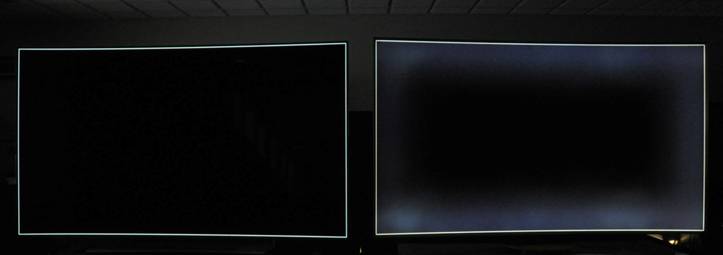
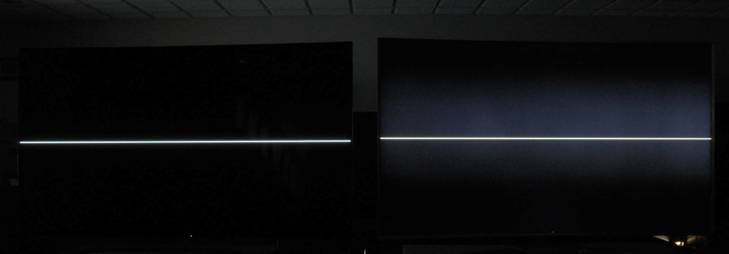
Screen shots demonstrating Local Dimming: Below are photographic screen shots of both TVs to demonstrate these Black level and Local Dimming issues. Both photos were taken of images made with just single pixel width horizontal and vertical lines – the first is along all the outside edges of the screen, and the second just has a single horizontal line across the center of the screen. The photos were taken in the dark, with no light falling on the screens, but with the area behind the TVs dimly backlit for visual reference. A few tiny lights in the lab below the TVs are also seen. The LG OLED TV remains perfectly black except for the single pixel width lines. The Samsung LCD TV shows large scale areas of the screen with a visible gray background glow due to the Local Dimming management issues mentioned above. The photos demonstrate the compromises and limitations of Full Array Local Dimming.
| Comparison of OLED with LCD Full Array Local Dimming | LG OLED TV | Samsung LCD TV | | | LG OLED TV | Samsung LCD TV |
Color Gamuts Both TVs have a native Color Gamut based on the larger DCI-P3 Gamut proposed for UHD TVs. Although the UHD Alliance standard has not been finalized, UHD TVs will need 90 percent or more of the DCI-P3 Gamut. We measured 93 percent of DCI-P3 for the LG OLED TV and 104 percent of DCI-P3 for the Samsung LCD TV, which are shown in Figure 1 along with other TV Picture Modes. So both TVs meet the proposed UHD standard. The Samsung LCD is able to exceed the DCI-P3 Color Gamut by using Quantum Dots, which are explained in detail in this earlier article.
Since over 99 percent of all currently available consumer content is based on Full HD, which uses the sRGB / Rec.709 Color Gamut, both TVs also need to support this Standard Gamut, which is called the Cinema mode for the LG OLED TV and the Movie mode for the Samsung LCD TV. It is implemented using Color Management of the larger native DCI Color Gamut. We measured 106 percent of the sRGB / Rec.709 Standard for both TVs, which are shown in Figure 1 along with other Picture Modes. They are both a very good match to the sRGB / Rec.709 Standard, with the 6 percent excess primarily resulting from a slightly over saturated Blue Primary, which isn’t as important as accurate Red and Green primaries as explained in this article. See the Colors and Intensities section and Figure 1 for measurements and details. The Color Gamuts also vary significantly with Viewing Angle, see below.
Another very important point that is widely misunderstood is that the TV should actually be set to match the Color Gamut that was used in producing the original picture content that is being shown, and not a larger Color Gamut because that makes the colors worse, not better. A UHD TV can not increase the Color Gamut of any earlier non-UHD picture content. Using the larger UHD DCI Color Gamut for Full HD content can not show additional colors that are not present in the original content – so it will just exaggerate and distort the true image colors.
Absolute Color Accuracy Color accuracy is particularly important for TVs, and their accuracy has been steadily improving as the result of many more manufacturers using fully automated color calibration with instruments at the factory instead of having assembly workers visually tweaking the colors.
We measured the Absolute Color Accuracy of both TVs for the sRGB / Rec.709 Color Gamut, which accounts for over 99 percent of all current consumer content. In the future we’ll measure it for the UHD DCI Color Gamut once the Standard is finalized and a reasonable amount of consumer content becomes available.
Both TVs have very good color accuracy – both are tied with an impressive Average Color Error of 1.8 JNCD, which is typically visually indistinguishable from perfect (but their Maximum Color Errors are larger) – the most color accurate TVs that we have ever measured. See thisFigure for an explanation and visual definition of JNCD and the detailed Color Accuracy Plots showing the measured Color Errors for both TVs. See the Colors and Intensities section and this Figure for measurements and details. Note that these measurements are only for 0 degrees Viewing Angle – the Color Accuracy also varies with Viewing Angle in the same way as the Color Gamut, see below.
Gray Scales and Image Contrast The Intensity Scale (sometimes called the Gray Scale) generally gets less attention, but it is extremely important because it not only controls the contrast within all displayed images but it also controls how the Red, Green and Blue primary colors mix to produce all of the on-screen colors. So if the Intensity Scale doesn't closely follow the Standard that was used in producing the content then the colors and intensities will be wrong everywhere in all images.
The steeper the Intensity Scale the greater the image contrast and the higher the saturation of displayed color mixtures. The Intensity Scale is logarithmic and its steepness is called the display’s Gamma. The Gamma for the LG OLED TV Intensity Scale is 2.16, which is fairly close to the Standard Gamma of 2.20. The Gamma for the Samsung TV is 2.07, which is noticeably lower than the Standard (and with a large 21 percent Luminance bump at 35 percent signal intensity). Figure 3 shows the measured Intensity Scales for the TVs alongside the industry standard Gamma of 2.2. See the Colors and Intensities section and Figure 3 for measurements and details. The Intensity Scales and Gamma also vary significantly with Viewing Angle, see below.
Changes with Viewing Position and Angle Large screen TVs are often watched by multiple viewers from a wide range of viewing positions and angles. So far we have examined how the TV displays perform from the ideal central Sweet Spot with a 0 degrees Viewing Angle. We now consider how each of the TV display performance and picture quality metrics examined above change (degrade) with Viewing Angle. All displays and display technologies show some variation for each metric with angle. The smaller the change with Viewing Angle the better. We repeated the tests and measurements at a 45 degree Viewing Angle, which is typical for TVs, and also at 60 degrees to see what happens at larger angles.
As shown in detail below, the LG OLED TV shows relatively small changes with Viewing Angle for all of the display metrics, as we had expected. On the other hand, the Samsung LCD TV shows rather large changes with Viewing Angle for all of the display metrics, which was unexpected and surprising for a high-end TV. The source of the problem is that Samsung is using an LCD panel with PVA LCD technology instead of IPS, FFS, or PLS LCD technology, which many consumers know are found in the best and highest performing LCD smartphones, tablets, and monitors because of their excellent wide viewing angle performance with small color and contrast changes with angle. In addition, using a larger DCI Color Gamut together with a PVA LCD magnifies the color changes and shifts with angle.
Measurements with Viewing Angle The changes with Viewing Angle are quite large and very important so we covering them in detail below. We cover each of the display metrics in turn, and then include some screen shot photos of the TVs to show these effects visually. The links below are for the Figures that clearly show how each of the metrics varies with Viewing Angle. All of the display performance metrics that we measured and discussed above can change significantly, even drastically with Viewing Angle and position. We examine each one in turn:
Color Changes and Shifts with Viewing Angle: One of the biggest challenges for TV picture quality is minimizing any noticeable changes or shifts in the image colors with Viewing Angle – both the hue and saturation. Pure White and the fully saturated native pure Red, Green and Blue Primary Colors for each display change the least with Viewing Angle – it is actually the large range of colors that lie in the middle in between the outer fully saturated native Primaries and the inner central White point that change the most with Viewing Angle, and that is where most TV picture content exists.
To evaluate the Color Changes with Viewing Angle we measured the shift in the Primary Colors for the sRGB / Rec.709 Color Gamut, which accounts for over 99 percent of the current consumer content. This shows how the internal sRGB / Rec.709 Primary Colors change, but these same effects apply to most picture colors and content as explained above. For the LG OLED TV the entire Color Gamut changes only slightly, increasing by 7 and 9 percent at 45 and 60 degrees. For the Samsung LCD TV the entire Color Gamut changes drastically, decreasing by 42 and 59 percent at 45 and 60 degrees, producing very noticeable color shifts and loss of color saturation with Viewing Angle. This Figure shows how the colors shift from 0 degrees to 45 and 60 degrees. Screen shots are shown below.
Brightness Decreases with Viewing Angle: For almost all displays the picture brightness will decrease with increasing in Viewing Angle. As long as it isn’t too large it’s not really objectionable because it doesn’t distort or reduce the picture quality, it just dims the picture. For the LG OLED TV the maximum brightness (Luminance) decreases by just 19 percent at 45 degrees, but the Samsung LCD TV has a large 52 percent decrease, which is quite noticeable and significant. This Figure shows how the Brightness decreases in 5 degree increments up to 60 degrees.
Black Level Increases with Viewing Angle: There is no change in the Black Level with Viewing Angle for the LG OLED TV (0 percent increase), but there is a very large increase in the Brightness of the Black Level for the Samsung LCD TV, an increase of 419 percent at 45 degrees, often resulting in a noticeable background haze across the image even at moderate Viewing Angles. This increase does not depend or change with LCD Local Dimming. This Figure shows how the Black Level increases in 5 degree increments up to 60 degrees.
Intensity Scale Changes with Viewing Angle: There is essentially no change in the Intensity Scale for the LG OLED TV with Viewing Angle but a very large change for the Samsung LCD TV, which is shown in this Figure. The Intensity Scale variation with angle is the root cause of all the other changes with angle.
Screen Shot Photos with Viewing Angle The photos below are screen shots of both TVs at 0 degrees and 45 degrees Viewing Angles for visually comparing the changes with Viewing Angle. For the 45 degrees side viewing angle, the keystone geometric distortion that is normally seen from that position has been removed to make the comparison with 0 degrees more straight forward. Note that the best way to visually evaluate changes with Viewing Angle is to look at a fixed image while you shift your viewing position. The photos below are of a Red Barn Door from the DisplayMate Multimedia with Test Photos Edition. The LG OLED TV shows only a slight color change between the 0 and 45 degrees Viewing Angle positions. On the other hand, the Samsung LCD TV shows relatively large changes in hue, saturation, and image contrast between the 0 and 45 degrees Viewing Angle positions for the reasons explained above. The camera exposures were adjusted to equalize the photo brightness levels, so the differences in display brightness are not shown. Note that all of the white knobs have roughly the same appearance and brightness. The Samsung LCD TV shows a more saturated orange color at 0 degrees as the result of the somewhat different color calibrations and Intensity Scales for the two TVs (see Figure 2and Figure 3). The point being demonstrated here is the color change with Viewing Angle and not the difference in the color calibration between the two TVs. LG OLED TV 0 degrees Viewing Angle – ExactCenter View | | Samsung LCD TV 0 degrees Viewing Angle – ExactCenter View | | | | LG OLED TV 45 degrees Viewing Angle – View from the Side | | Samsung LCD TV 45 degrees Viewing Angle – View from the Side | | | |
Response Time and Motion Blur Motion Blur is a well known issue with LCDs that is seen with rapidly moving objects in the picture, and also when the camera itself moves, which shifts the entire screen image all at once. It arises because the Liquid Crystal, which is the active element within an LCD, is unable to change its orientation and light transmission rapidly enough when the picture changes from one frame or refresh cycle to the next. OLEDs, as solid state emissive devices, have very fast Response Times: LG specifies the OLED Response Time at 0.1ms, which is more than a factor of 10 faster than LCDs.
For the Response Time and Motion Blur tests we photographed a DisplayMate Multimedia with Motion Edition Test Pattern moving at a moderately fast Full HD 1,272 pixels per second using a Nikon DSLR camera with a shutter speed of 1/320th of a second, which is faster than the Refresh Rate and motion compensation rate for the TVs. At 1,272 pixels per second it takes 1.2 seconds to move diagonally across the entire screen.
The LG OLED TV screen shot below shows a single crisp image, without any visible latent blur or ghost images left over from earlier refresh cycles or any shading in the image (see below). This indicates a Response Time that is significantly faster than 5ms.
For the Samsung LCD TV screen shot it is possible to make out a total of 4 images of the moving diamond-box (the current and 3 earlier images) on the gray background at the 120 Hz refresh rate, indicating a Response Time in the neighborhood of 20 ms for this LCD.
The darker gray shading gradient to the bottom and right sides of the Samsung LCD TV screen shot photograph is due to the limited response time of the LCD to the gray block moving on the black screen background. Gray response times are typically longer. |

 京公网安备 11010602010207号
( 京ICP证041102号,京ICP备09075138号-9 )
京公网安备 11010602010207号
( 京ICP证041102号,京ICP备09075138号-9 )




 狗仔卡
狗仔卡

 发表于 2016-7-14 14:32






 变色卡
变色卡




 楼主
楼主