Galaxy Note 3 Display Technology Shoot-Out
Samsung Galaxy Note 3 – Samsung Galaxy Note II
Dr. Raymond M. SoneiraPresident, DisplayMate Technologies Corporation
Copyright © 1990-2013 by DisplayMate Technologies Corporation. All Rights Reserved.
This article, or any part thereof, may not be copied, reproduced, mirrored, distributed or incorporated
into any other work without the prior written permission of DisplayMate Technologies Corporation
| Article Links: Samsung Galaxy S4 Display Technology Shoot-OutArticle Links: Samsung Galaxy S I II III OLED Display Technology Shoot-Out Article Links: Smartphone Displays Under High Ambient Lighting Shoot-OutArticle Links: Automatic Brightness Controls and Light Sensors Article Links: Mobile Display Shoot-Out Article Series Overview and Home PageArticle Links: Display Technology Shoot-Out Article Series Overview and Home Page |
Introduction
The Samsung Galaxy Note and Galaxy S Smartphones are flagship products for Samsung to show off its latest and greatest OLED display technology. The Galaxy Note 3 has the newest generation of OLED display technology. The Lab tests show that it is better than the Note II in every measurement category, and also comparable or better than the display on the Galaxy S4. It has double the resolution of the Note II, which is a major improvement, but the most impressive advancement for the Note 3 is its significantly brighter screen. We’ll cover these issues and much more, with in-depth comprehensive display tests, measurements and analysis that you will find nowhere else.
OLED Displays
While most mobile displays are still LCD based, OLEDs have been capturing a rapidly increasing share of the mobile display market. The technology is still very new, with the Google Nexus One Smartphone, launched in January 2010, as the first OLED display product that received widespread notoriety. In a span of just a few years this new display technology has improved at a very impressive rate, now challenging and even exceeding the performance of the best LCDs. Virtually all of the OLED displays in current mobile devices are produced by Samsung Display. We have provided an in-depth analysis on the evolution of OLEDs in our Galaxy S I,II,III OLED Display Technology Shoot-Out and Galaxy S4 Display Technology Shoot-Out articles.
Samsung provided DisplayMate Technologies with a pre-release production unit to test and analyze for this Display Technology Shoot-Out article.
The Shoot-Out
To examine the performance of the Samsung Galaxy Note 3 we ran our in-depth series of Galaxy S4 Smartphone, which launched in April. The Lab tests below show that it is better than the Note II in every measurement category, and also comparable or better than the Galaxy S4. It has double the resolution of the Note II, which is a major improvement, but the most important advancement for the Note 3 is its significantly brighter screen…
Impressive Brightness
Up until the Galaxy Note 3, OLED displays have been somewhat to significantly dimmer than competing LCD displays. The Note 3 has changed that in a big way…it’s an impressive 55 percent brighter than the Note II and a solid 25 percent brighter than the Galaxy S4. For most image content it provides over 400 cd/m2, comparable or higher than most LCD displays in this size class. Even more impressive is that when Automatic Brightness is turned on, the Note 3 hits an incredible 660 cd/m2 in high ambient light, where it’s needed (85 percent brighter than the Note II and 40 percent brighter than the Galaxy S4 with Automatic Brightness) – the brightest mobile display we have ever tested in the Shoot-Out series. An impressive achievement for OLEDs!
Multiple Screen Modes and Color Management
Most Smartphones and Tablets only provide a single fixed factory set display calibration, with no way for the user to alter it based on personal preference, the running application, or the ambient light level. An important capability provided by the more recent Galaxy Note and Galaxy S Smartphones is the inclusion of a number of Screen Modes that provide different levels of user selectable color saturation and display calibration based on user and application preferences. The Galaxy Note 3 has 5 user selectable Screen Modes: Adapt Display, Dynamic, Standard, Professional Photo, and Movie, which we discuss below and include measurements for several Modes. The Screen Modes require the implementation of Color Management to adjust the native Color Gamut of the display plus additional factory calibration for each Mode.
Color Gamut and Absolute Color Accuracy
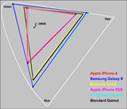
The Note 3 Movie Mode delivers the most accurate Color and White Point calibration for the Standard sRGB/Rec.709 consumer content that is used for virtually all digital camera, HDTV, internet, and computer content, including photos and videos. Use the Movie Mode for the best color and image accuracy. The measured Absolute Color Accuracy for the Movie Mode is an excellent 3.1 JNCD. See this Figure for an explanation of JNCD. The Adapt Display Mode is the default mode for the Galaxy Note 3 – it provides adaptive image processing and delivers higher color saturation, which appeals to some, and is also a better choice for high ambient light viewing conditions, which wash out image colors and contrast. This mode is very similar to the Professional Photo Mode, but has a more bluish White Point. Compare the Color Gamuts in this Figure and below.
Professional Photo Mode
Most high-end digital cameras have an option to use the Adobe RGB Gamut, which is 17 percent larger than the Standard sRGB/Rec.709 Gamut used in consumer cameras. The Professional Photo Mode on the Note 3 provides a fairly accurate calibration to the Adobe RGB standard, which is rarely available in consumers displays, and is very useful for high-end digital photography applications. The measured Absolute Color Accuracy of the Professional Photo Mode is 4.4 JNCD, which is Very Good. See this Figure for an explanation of JNCD.
Performance in High Ambient Lighting
Mobile displays are often used under relatively bright ambient lighting, which washes out image colors and contrast, reducing picture quality and making it harder to read the screen. To be usable in high ambient light a display needs high screen Brightness and low screen Reflectance – the Note 3 has both. In fact, with Automatic Brightness turned on, the Note 3 has the highest Contrast Rating for High Ambient Light we have ever measured, which quantitatively measures screen visibility under bright ambient lighting – the higher the better. This article has screen shots that show how screen images degrade in High Ambient Lighting. On the Note 3 the Brightness can be set much higher for Automatic Brightness so that users can’t permanently set the Manual Brightness slider to very high values, which would run down the battery quickly. This extra high level of Brightness is only needed for high Ambient Light. In addition, the Adapt Display, Standard and Dynamic Modes also have much higher Color Saturation, which also improves screen visibility in high Ambient Light.
Viewing Angle Performance
While the Note 3 is primarily a single viewer device, the variation in display performance with viewing angle is still very important because single viewers frequently hold the display at a variety of viewing angles. The angle is often up to 30 degrees, more if it’s resting on a table or desk. While LCDs typically experience a 55 percent or greater decrease in brightness at a 30 degree Viewing Angle, the Note 3 shows a much smaller 22 percent decrease in brightness at 30 degrees. This also applies to multiple side-by-side viewers as well, and is a significant advantage for OLED displays.
A Full HD 1920x1080 Display
The Galaxy Note II (like the Galaxy S III) has a 1280x720 display. The Galaxy Note 3 (like the Galaxy S4)
provides a full High Definition 1920x1080 display, with more than double the number of pixels – the same pixel resolution as your 50 inch living room HDTV – that’s very impressive! First of all, this is a benchmark spec with tremendous marketing power for driving consumer sales. But there are other important reasons for going to Full HD – there is a tremendous amount of 1920x1080 content available. Displaying that content at its native resolution (without the need to rescale up or down) results in the best possible image quality, plus rescaling requires processing overhead that uses (wastes) precious battery power.
Image Sharpness and Pixels Per Inch
The Galaxy Note 3 has a pixel density of 388 Pixels Per Inch PPI, which is very high, but lower than the 441 PPI for the Galaxy S4 and other Full HD Smartphone displays. It’s important to recognize that this is not a decrease in visual image sharpness because the display still appears perfectly sharp for 20/20 Vision at typical viewing distances of 13 inches or more because the Pixels and Sub-Pixels are below normal visual acuity. (The Galaxy Note is 14 percent larger than the Galaxy S4 so it is typically held further away). The Galaxy Note 3 also has a PenTile Sub-Pixel arrangement like the Galaxy S4, with only 2 Sub-Pixels per Pixel instead of the usual 3. But at these very high PPIs, it’s not visually noticeable because of the use of Sub-Pixel Rendering and the Diamond Sub-Pixel arrangement discussed below. For more information on visual image sharpness see High PPI PenTile Displays and Visual Sharpness and Resolution.
Diamond Pixels
A high resolution screen shot of the Galaxy Note 3 (provided by Samsung) shows an interesting design and sub-pixel arrangement, which Samsung calls Diamond Pixels. First of all, the Red, Green, and Blue sub-pixels have very different sizes – Blue is by far the largest because it has the lowest efficiency, and Green is by far the smallest because it has the highest efficiency. The alternating Red and Blue sub-pixel PenTile arrangement discussed above leads to a 45 degree diagonal symmetry in the sub-pixel layout. Then, in order to maximize the sub-pixel packing and achieve the highest possible PPI, that leads to diamond rather than square or stripe shaped Red and Blue sub-pixels. But not for the Green sub-pixels, which are oval shaped because they are squeezed between two much larger and different sized Red and Blue sub-pixels. It’s display art…
Power Efficiency
We measured an impressive 26 percent improvement in power efficiency between the Galaxy Note 3 and Note II. While LCDs remain more power efficient for images with mostly white content (like text screens, for example), OLEDs are more efficient for darker content because they are emissive rather than transmissive like LCDs. In fact, the Galaxy Note 3 is 31 percent more power efficient than the Full HD LCD Smartphones we recently tested for mixed image content (that includes photos and videos, for example) with a 50 percent Average Picture Level, APL.
Screen Uniformity
One subtle but important advantage of OLEDs is their excellent screen uniformity compared to LCDs, which often show hot spots and shadows from edge LED lighting.
Viewing Tests
The Galaxy Note 3 Movie Mode provides very nice, pleasing, and accurate colors and picture quality. The Movie Mode is recommended for indoor and low ambient light viewing. The Adapt Display and Standard Modes have significantly more vibrant and saturated colors. Some people like that. They are recommended for medium levels of ambient light viewing because it offsets some of the reflected glare that washes out the images. The Dynamic Mode provides incredibly powerful colors that are overwhelming in low ambient lighting. The Dynamic Mode is recommended for high ambient light viewing, for some games and cartoons, and possibly for persons with visual impairments.
Comparison with the Galaxy Note II
The Galaxy Note 3 display is a major enhancement and improvement over the Galaxy Note II – a good reason to consider trading up. The Full HD 1920x1080 display on the Galaxy Note 3 has more than double the number of pixels and is noticeably sharper then the lower resolution HD 1280x720 display on the Note II, particularly with text and graphics. But the most striking difference is the 55 percent brighter display on the Note 3 (and 85 percent brighter with Automatic Brightness). Consistent with the differences in their Color Gamuts and Intensity Scales, the Movie Mode was slightly more vivid on the Note 3 and the Standard Mode slightly more vivid on the Note II.
Galaxy Note 3 Conclusions: An Impressive OLED Display…The Galaxy Note 3 continues the rapid and impressive improvement in OLED displays and technology. The first notable OLED Smartphone, the Google Nexus One, came in decidedly last place in our 2010 Smartphone Display Shoot-Out. In a span of just a few years OLED display technology is now challenging and even exceeding the performance of the best LCDs across the board in brightness, contrast, color accuracy, color management, picture quality, screen uniformity, and viewing angles. OLEDs are also considerably thinner than LCDs but still cost considerably more to manufacture.
The Galaxy Note 3 has the newest generation of OLED display technology. The Lab tests show that it is better than the Note II in every measurement category, and also comparable or better than the display on the Galaxy S4. It has double the resolution of the Note II, which is a major improvement, but the most impressive advancement for the Note 3 is its significantly brighter screen, which hits an incredible 660 cd/m2 in high ambient light, the brightest mobile display we have ever tested in the Shoot-Out series. An impressive achievement for OLEDs!
OLEDs need to continue improving their power efficiency, which is critically important for mobile displays. We measured an impressive 26 percent improvement in power efficiency between the Galaxy Note 3 and Note II. While LCDs remain more power efficient for images with mostly white content (like text screens, for example), OLEDs are more efficient for darker content because they are emissive rather than transmissive like LCDs. In fact, Galaxy Note 3 is already 31 percent more power efficient than the Full HD LCD Smartphones we recently tested for mixed image content (that includes photos and videos, for example) with a 50 percent Average Picture Level, APL. If this keeps up then OLEDs may pull ahead of LCDs in total power efficiency in the near future…
What’s Next… The most important developments for the upcoming generations of both OLED and LCD mobile displays will come from improvements in their image and picture quality in ambient light, which washes out screen images, resulting in reduced readability, image contrast, and color saturation and accuracy. The key will be in dynamically changing the display’s color management and intensity scales in order to automatically compensate for reflected glare and image wash out from ambient light. See this article on display performance in ambient light. The displays and technologies that succeed in implementing this new strategy will take the lead in the next generations of mobile displays…
DisplayMate Display Optimization TechnologyAll Smartphone and Tablets displays can be significantly improved using DisplayMate’s advanced scientific analysis and mathematical display modeling and optimization of the display hardware, factory calibration, and driver parameters. We help manufacturers with expert display procurement, prototype development, and production quality control so they don’t make mistakes similar to those that are exposed in our Display Technology Shoot-Out series. We can also improve the performance of any specified set of display parameters. This article is a lite version of our intensive scientific analysis – before the benefits of our DisplayMate Display Optimization Technology, which can correct or improve all of these issues. If you are a display or product manufacturer and want to significantly improve display performance for a competitive advantage then Contact DisplayMate Technologies.
Display Shoot-Out Comparison TableBelow we compare the display on the Samsung Galaxy Note 3 with the Galaxy Note II based on objective Lab measurement data and criteria. For additional background and information see the Galaxy S4 Display Technology Shoot-Out that compares the Galaxy S4 with the iPhone 5, and the Galaxy SI,II,III Display Technology Shoot-Out that compares and analyzes the evolution of the OLED displays on the Galaxy S I, II, and III.
Categories | Samsung Galaxy Note II | Samsung Galaxy Note 3 | Comments |
Display Technology | 5.5 inch RGB Stripe OLED | 5.7 inch PenTile Diamond Pixels OLED | Organic Light Emitting Diode |
Screen Shape | 16:9 = 1.78 Aspect Ratio | 16:9 = 1.78 Aspect Ratio | The Galaxy Note 3 and Galaxy Note II screens have the same shape as widescreen HDTV video content. |
Screen Area | 13.1 Square Inches | 13.8 Square Inches | A better measure of size than the diagonal length. |
Relative Screen Area | 95 percent | 100 percent | Screen Area relative to the Galaxy Note 3. |
Display Resolution | 1280 x 720 pixels | 1920 x 1080 pixels | Screen Pixel Resolution. |
Total Number of Pixels | 0.92 Mega Pixels | 2.1 Mega Pixels | Total Number of Pixels. |
Pixels Per Inch | 265 PPI Very Good | 388 PPI PenTile Excellent | Sharpness depends on the viewing distance and PPI. See this on the visual acuity for a true Retina Display |
Sub-Pixels Per Inch | Red 265 SPPI Green 265 SPPI Blue 265 SPPI | Red 274 SPPI Green 388 SPPI Blue 274 SPPI | PenTile displays have only half the number of Red and Blue Sub-Pixels as standard RGB displays. |
Total Number of Sub-Pixels | Red 922 KSP Green 922 KSP Blue 922 KSP | Red 1,037 KSP Green 2,074 KSP Blue 1,037 KSP | Number of Kilo Sub-Pixels KSP for Red, Green, Blue. PenTile displays have only half the number of Red and Blue Sub-Pixels as standard RGB displays. |
20/20 Vision Distance where Pixels or Sub-Pixels are Not Resolved | 13.0 inches White / Green 13.0 inches Red / Blue | 8.9 inches for White and Green 12.5 inches for Red and Blue | For 20/20 Vision the minimum Viewing Distance where the screen appears perfectly sharp to the eye. At 14 inches from the screen 20/20 Vision is 246 PPI. |
Photo Viewer Color Depth | Full 24-bit color No Dithering Visible 256 Intensity Levels | Full 24-bit color No Dithering Visible 256 Intensity Levels | Many Android Smartphones and Tablets still have some form of 16-bit color depth in the Gallery Photo Viewer. The Samsung Galaxy Notes do not have this issue. |
Overall Assessments This section summarizes the results of all of the extensive Lab measurements and viewing tests performed on the displays.
|
| Galaxy Note II Standard & Movie Modes | Galaxy Note 3 | Comments |
Adapt Display Mode | Movie Mode |
Viewing Tests in Subdued Ambient Lighting | Standard Mode Intentionally Vivid
Movie Mode Accurate Mode | Good Images Photos and Videos have too much color and accurate contrast
Intentionally Vivid | Very Good Images Photos and Videos have very good color and accurate contrast
Accurate Mode | The Viewing Tests examined the accuracy of photographic images by comparing the displays to a calibrated studio monitor and HDTV. |
Variation with Viewing Angle | Small Color Shifts with Viewing Angle
Small Brightness Shift with Viewing Angle | Small Color Shifts with Viewing Angle
Small Brightness Shift with Viewing Angle | Small Color Shifts with Viewing Angle
Small Brightness Shift with Viewing Angle | The OLED Galaxy Notes have a relatively small Brightness decrease with Viewing Angle and relatively small Color Shifts with Viewing Angle. |
Overall Display Assessment Lab Tests and Measurements | Good OLED Display | Excellent OLED Display | Excellent OLED Display | The Galaxy Note 3 is significantly brighter, better calibrated, and much higher resolution than the Galaxy Note II. |
Overall Display Calibration Lab Tests and Viewing Tests | Standard Mode Good Calibration Intentionally Vivid
Movie Mode Very Good Calibration Accurate Mode | Good Calibration Intentionally Vivid | Very Good Calibration Accurate Mode | Both Galaxy Notes have multiple Screen Modes that deliver accurately calibrated images and also Vivid Modes preferred by some users and that also perform better in high Ambient Light. |
Overall Display Grade | B+ | A | The Galaxy Note 3 delivers excellent image quality, has both Accurate and Vivid modes, has high Brightness and low Reflectance, and is an all around top performance display. |
Screen Reflections All of these screens are large mirrors good enough to use for personal grooming – but it’s actually a very bad feature… We measured the light reflected from all directions and also direct mirror (specular) reflections, which are much more distracting and cause more eye strain. Many Smartphones still have greater than 10 percent reflections that make the screen much harder to read even in moderate ambient light levels, requiring ever higher brightness settings that waste precious battery power. Hopefully manufacturers will reduce the mirror reflections with anti-reflection coatings and matte or haze surface finishes.
|
| Galaxy Note II | Galaxy Note 3 | Comments |
Average Screen Reflection Light From All Directions | Reflects 4.9 percent Excellent | Reflects 4.8 percent Excellent | Measured using an Integrating Hemisphere. The best value we have measured is 4.4 percent and the current worst is 14.8 percent. |
Mirror Reflections Percentage of Light Reflected | 6.4 percent Very Good | 6.7 percent Very Good | These are the most annoying types of reflections. Measured using a narrow collimated pencil beam of light reflected off the screen. |
Brightness and Contrast The Contrast Ratio is the specification that gets the most attention, but it only applies for low ambient light, which is seldom the case for mobile displays. Much more important is the Contrast Rating, which indicates how easy it is to read the screen under high ambient lighting and depends on both the Maximum Brightness and the Screen Reflectance.
|
| Galaxy Note II
Standard Mode | Galaxy Note 3 | Comments |
Adapt Display Mode | Movie Mode |
Measured Average Brightness 50% Average Picture Level | Brightness 250 cd/m2 Good | Brightness 394 cd/m2 Very Good | Brightness 376 cd/m2 Very Good | This is the Brightness for typical screen content that has a 50% Average Picture Level. |
Measured Brightness 100% Full Screen White | Brightness 225 cd/m2 Poor | Brightness 341 cd/m2 Very Good | Brightness 329 cd/m2 Very Good | This is the Brightness for a screen that is entirely all white with 100% Average Picture Level. |
Measured Peak Brightness 1% Full Screen White | Brightness 289 cd/m2 Good | Brightness 447 cd/m2 Very Good | Brightness 420 cd/m2 Very Good | This is the Peak Brightness for a screen that has only a tiny 1% Average Picture Level. |
Measured Peak Brightness with Automatic Brightness | Brightness 353 cd/m2 Very Good | Brightness 660 cd/m2 Excellent | Brightness 628 cd/m2 Excellent | Some displays including the Galaxy Note 3 have higher Brightness in Automatic Brightness Mode. |
|
Black Level at Maximum Brightness | 0 cd/m2 Outstanding | 0 cd/m2 Outstanding | 0 cd/m2 Outstanding | Black brightness is important for low ambient light, which is seldom the case for mobile devices. |
Contrast Ratio Relevant for Low Ambient Light | Infinite Outstanding | Infinite Outstanding | Infinite Outstanding | Only relevant for low ambient light, which is seldom the case for mobile devices. |
Contrast Rating for High Ambient Light | 46 – 59 Very Good
72 Auto Brightness Very Good | 71 – 93 Very Good
138 Auto Brightness Excellent | 69 – 88 Very Good
131 Auto Brightness Excellent | Depends on the Screen Reflectance and Brightness. Defined as Maximum Brightness / Average Reflectance. |
Screen Readability in High Ambient Light | Very Good A–
Very Good A for Auto Brightness
High Color Saturation | Very Good A
Excellent A+ for Auto Brightness
High Color Saturation | Very Good A
Excellent A+ for Auto Brightness
| Indicates how easy it is to read the screen under high ambient lighting. Depends on both the Screen Reflectance and Brightness. See High Ambient Light Screen Shots
High Color Saturation improves screen readability in High Ambient Light. |
Colors and Intensities
Figure 1 Color Gamuts Click to Enlarge | |
| See Figure 1 | 7,675 K Standard Mode Somewhat Too Blue Intentionally Bluish Mode | 7,560 K Somewhat Too Blue Intentionally Bluish Mode
See Figure 1 | 6,612 K Close to Standard Accurate Mode For Photos & Videos
See Figure 1 | D6500 is the standard color of White for most Content and needed for accurate color reproduction. See Figure 1 for the plotted White Points. | 6,597 Movie Mode Close to Standard For Photos & Videos | Color Gamut Measured in the dark at 0 lux See Figure 1 | 134 percent Standard Mode Somewhat Large Intentionally Vivid | 130 percent Somewhat Large Intentionally Vivid
See Figure 1 | 113 percent Close to Standard Accurate Mode
See Figure 1 | sRGB / Rec.709 is the color standard for most content and needed for accurate color reproduction.
Note that Too Large a Color Gamut can be visually worse than Too Small. | 106 percent Movie Mode Accurate Mode Close to Standard | Absolute Color Accuracy Average Color Error for 11 Reference Colors See Figure 2 | 8.4 JNCD Standard Mode Intentionally Vivid | 7.0 JNCD Good Intentionally Vivid
See Figure 2 | 3.1 JNCD Very Good Accurate Mode
See Figure 2 | JNCD is aJust Noticeable Color Difference.
See Figure 2 for the definition of JNCD. | 3.7 JNCD Movie Mode Accurate Mode |
| Dynamic Brightness Luminance Reduction with Average Picture Level APL | 22 percent Good | 24 percent Good | 22 percent Good | This is the percent Brightness reduction with APL Average Picture Level. Ideally should be 0 percent. | Intensity Scale and Image Contrast See Figure 3 for the definition of JNCD. | Primary Color Shifts Largest Shift for R,G,B at a 30 degree Viewing Angle | Medium Color Shift Δ(u’v’) = 0.0313 for Red 7.8 times JNCD | Medium Color Shift Δ(u’v’) = 0.0304 for Red 7.6 times JNCD | JNCD is aJust Noticeable Color Difference. See Figure 3 for the definition of JNCD. | Color Shifts for Color Mixtures at a 30 degree Viewing Angle Reference Brown (255, 128, 0) | Medium Color Shift Δ(u’v’) = 0.0202 5.0 times JNCD | Small Color Shift Δ(u’v’) = 0.0123 3.1 times JNCD | JNCD is aJust Noticeable Color Difference. Color Shifts for non-IPS LCDs are about 10 JNCD.
Reference Brown is a good indicator of color shifts with angle because of unequal drive levels and roughly equal luminance contributions from Red and Green. See Figure 3 for the definition of JNCD. |
[table]
|
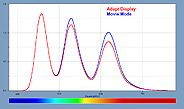
| Figure 4 Display Spectra Click to Enlarge | |
Display Power Consumption The display power was measured using a Linear Regression between Luminance and AC Power with a fully charged battery.
Since the displays have different screen sizes and maximum brightness, the values were also scaled to the same screen brightness (Luminance) and screen area in order to compare their relative Power Efficiencies.
The Galaxy Note 3 is 26 percent more Power Efficient than the Galaxy Note II. |
| Galaxy Note II Standard Mode | Galaxy Note 3 Adapt Display Mode | Comments |
Photo and Video Display Power Maximum Brightness at 20% Average Picture Level | 0.40 watts | 0.30 watts | This measures the average display power for typical photo and video content. |
Average Display Power Maximum Brightness at 50% Average Picture Level | 1.00 watts | 0.90 watts | This measures the average display power for a wide range of image content. |
Maximum Display Power Full White Screen at Maximum Brightness | 1.70 watts | 2.00 watts | This measures the display power for a screen that is entirely Peak White. |
Display Power Efficiency same Luminance 341 cd/m2 same 5.7 inch screen area | 2.71 watts | 2.00 watts | This compares the Maximum Power Efficiency by scaling to the same screen brightness and same screen area. |
Copyright © 1990-2013 by DisplayMate Technologies Corporation. All Rights Reserved.
This article, or any part thereof, may not be copied, reproduced, mirrored, distributed or incorporated
into any other work without the prior written permission of DisplayMate Technologies Corporation
 京公网安备 11010602010207号
( 京ICP证041102号,京ICP备09075138号-9 )
京公网安备 11010602010207号
( 京ICP证041102号,京ICP备09075138号-9 )




 狗仔卡
狗仔卡

 发表于 2013-10-2 08:13


 变色卡
变色卡

 楼主
楼主